Anything worth doing is worth doing badly
Big fan of KISS here, so if you’re expecting something fancy and elaborate, sorry to disappoint. A humble Raspberry Pi 5 serves as my sole homelab machine. It’s an 8GB box running Raspberry Pi OS.
Tailscale
Tailscale is the jewel in the crown and the bit that connects everything and brings it all together. It basically creates a private network plane where all my devices live. Whether I am connected to my home wifi, cellular or even travelling abroad, my devices can freely connect and talk to each other.
I can’t recommend Tailscale enough. It makes things so much easier and simpler to setup and navigate. In the rest of the post, we’ll see how Tailscale acts as an enabler.
I’d highly recommend following along with this post by Karan Sharma if the reader wants to try their hand at Tailscale.
Pi-hole + DoH
Pi-hole is where it all started for me. Who wouldn’t want less ads and trackers?
Although uBlock on Firefox does more than enough on my desktop, I can’t enjoy its protection on other devices. After much research, the only solution that came anywhere close to uBlock was a network-wide ad-blocker like Pi-hole.
The steps to install and activate Pi-hole are fairly well-documented on its website so I won’t repeat that here. The general approach after getting your Pi-hole running is to point your router’s DNS resolver to the IP of the Pi. This is well and good while you’re within your home network, but what about when you’re not? This is where Tailscale shines. Since all my devices run Tailscale all the time, including my pi, even when I’m outside of my home network I can point my DNS resolver to the Tailscale IP of the Pi and it just works.

A quick look today at the Pi-hole dashboard reveals that more than a quarter of the total queries made by my devices are ads, trackers etc. Thanks to Pi-hole, they don’t reach their intended destination.
Interestingly, Pi-hole also lets you setup DoH/DoT (DNS over HTTPS/TLS) in a few simple steps. I went for DoH with Cloudflared.
Obsidian + Syncthing
I’ve been using Obsidian religiously for over 4 years now.
Naturally, you’d want your note-taking tool to sync across your devices, in near real-time. I started with iCloud but very quickly encountered some major flaws in this setup:
- iCloud Sync is excruciatingly slow and unpredictable. It is its own master in that it syncs data in its own time. On top of that, there is no “Sync Now”-like feature that you can use to even manually sync outdated data.
- I’m not comfortable leaving that kind of data in the hands of Apple. There are plenty of horror stories out there where out-of-the-blue someone gets completely evicted out of their Google or Apple accounts without a prior warning, explanation or a due process.
So, I needed a solution that was local but still performant. The answer turned out to be Syncthing. It’s an open-source, p2p, file-sharing program which you can easily self-host.
It’s got a nifty web-client and a very capable oss iOS/iPadOS client called Synctrain.
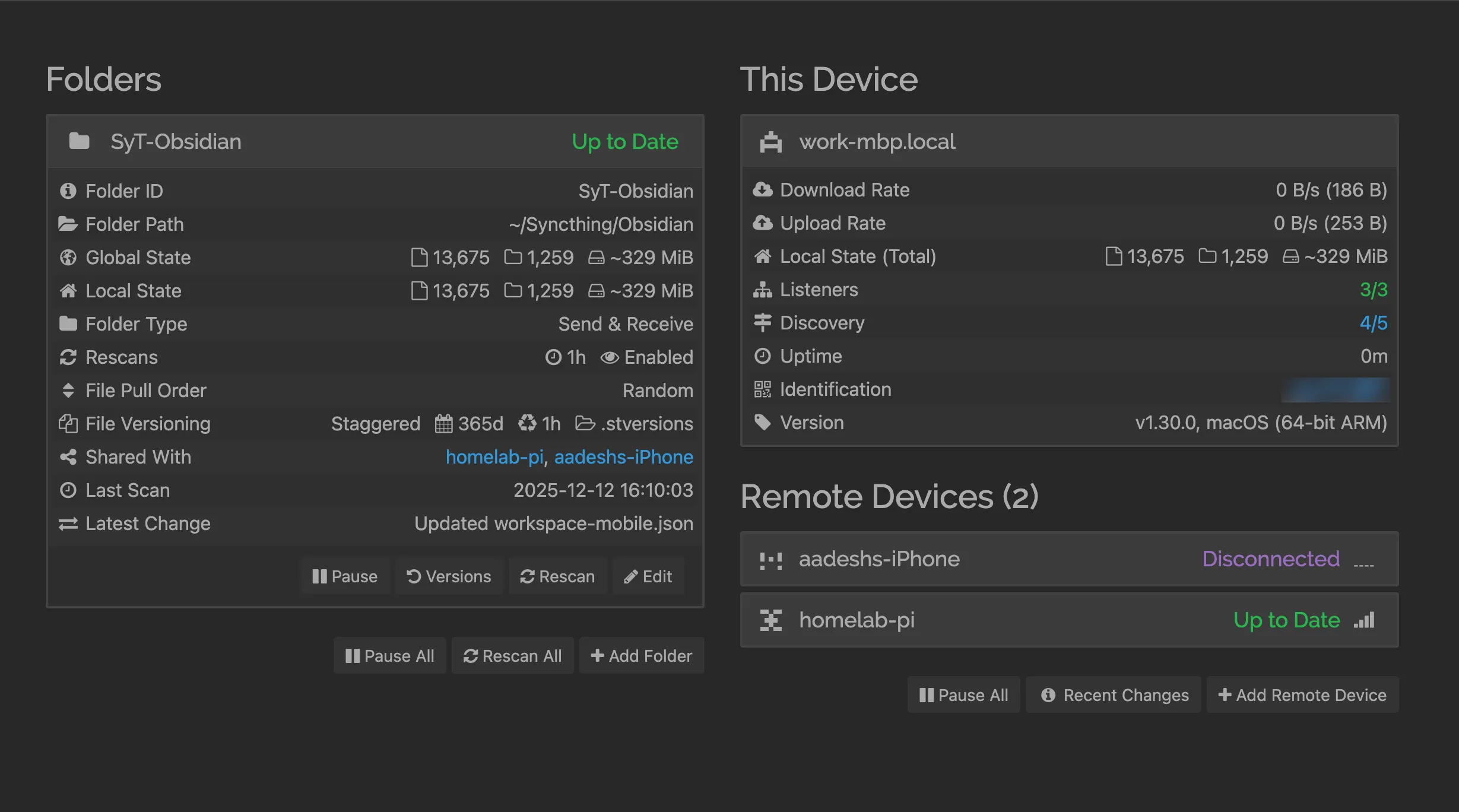
This is where the File Over App philosophy really shines. Obsidian is just a bunch of markdown files, which by their very nature are cross-platform and portable so you’re never locked into some proprietary platforms/apps and their formats, especially for this kind of personal data. Because it’s files all the way down, you can pick up any of the myriad different open-source file syncing solutions and be a happy camper.
Home Assistant

After resisting making my devices ‘smart’ for a really long time, it took one random winter morning when I felt too lazy to reach for my AC remote across the room, to compromise my principles. I don’t want more remotes.
Luckily, when I had bought my air conditioner I made sure it had Matter support. Matter is an open-source connectivity standard for IoT devices. It’s local and it’s interoperable. You don’t have to have dozens of different proprietary, vendor-specific apps to control your appliances and you will still be able to control them when either AWS or Cloudflare decide to perform their weekly downtime ritual.
You can either get Home Assistant (open-source and cross-platform) or use one of Apple Home, Google Home, Alexa etc.
Samba
They say that “the internet never forgets” and “once it’s on the internet, it’s there forever”. There’s also a flip side to it.
The world has moved to a digital-first media consumption, especially the distribution part. You watch movies on Netflix, listen to songs on Spotify and watch your favorite creator on YouTube. Everything is on-demand and easily accessible, until it’s not. You never really own this media, you rent it. I’m pretty sure most of us have experienced the loss of a saved track from our favourite playlist, a loved movie going off of Netflix or a “Video not available” greeting on YouTube.
All this to say that I tend to archive quite a lot of stuff. In addition to archiving, I also regularly back up stuff that is important to me. Therefore, I need to securely store all of this data in a way that it is easily accessible as well, basically a super simple NAS.
So I bought a 2TB NVMe and connected it to my Pi. Looking for an OSS solution with good community support, I came across the SMB protocol and Samba, its OSS implementation. Not going to cover the setup part here which is pretty well documented and you could always ask your favourite AI if you get stuck somewhere. The tricky bit turned out to be encrypting the drive such that it automatically mounts itself at startup. Took a few attempts but got it working with LUKS.
Tailscale again comes to the rescue here when you want to access this data outside of your home-network.
Closing Thoughts
A Raspberry Pi is a really powerful machine and it often goes underappreciated. You don’t need to be intimidated by the setups that are commonplace on r/homelab. Just pick up a pi and get started. You’ll learn a whole lot.